В предыдущих статьях было описано создание Web-сервера на связке Arduino Uno + Ethernet Shield W5100. Довольно симпатичное и простое решение, вполне подходящее как составная часть «умного дома»: с любого устройства, подключенного к домашней сети (компьютер, смартфон, планшет) можно заходить на «сайт дома» и управлять домашними приборами или смотреть их состояние…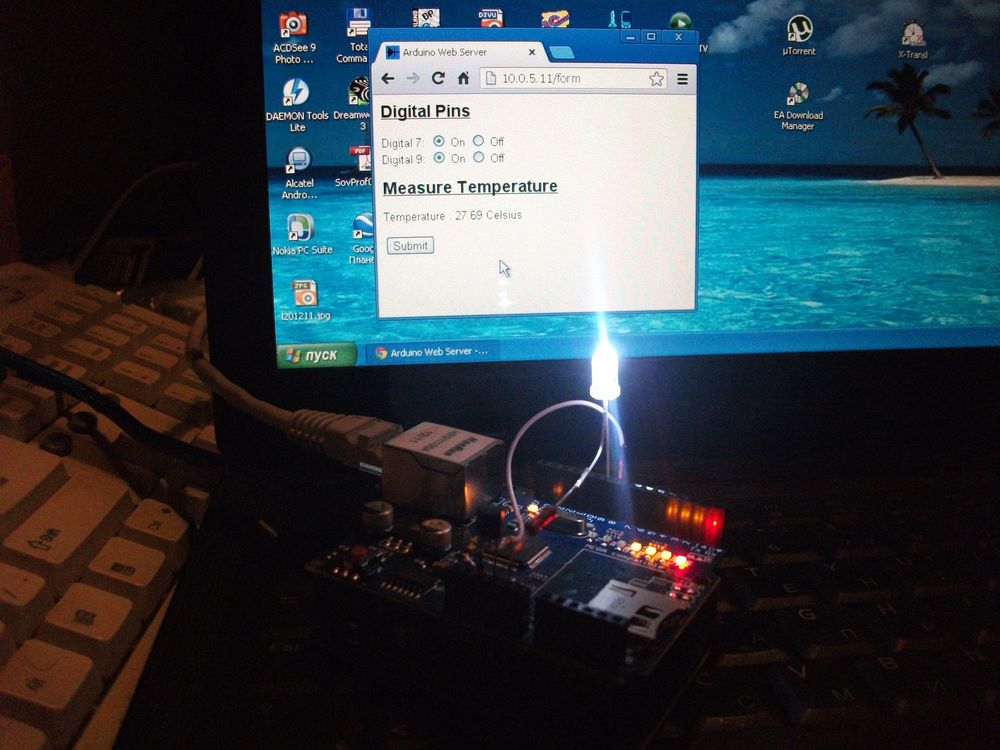
Однако, для доступа к «сайту» из-вне, требуется статический IP и «проброс» внешних запросов на ip адрес творения на Arduino, что не всегда возможно… В данной статье разобран иной подход к решению подобной задачи.
Схема работы системы управления «нашим умным домом» будет такой: где-то далеко (или близко) на нормальном хостинге создаем сайт, на котором размещаем пару php-файлов. Их задача отрабатывать запросы, идущие от «нашего умного дома» и от обычных клиентов-людей.
В первой части описывается пример Arduino-Ethernet-овской конструкции, выступающей в качестве Web-клиента, посылающего запросы на сервер. В запросе отправляется состояние домашних систем, в ответ, с сервера поступают данные о требуемых действиях. Если запросы делать достаточно часто, то время реакции на команду может быть вполне приемлемым.
«Каркас» схемы на Arduino тот же что, в приведенных выше статьях про Web-сервер: к UNO подцеплена плата на W5100. Один канал управления (светодиод на pin 9); одна анализируемая цифровая цепь (вход на pin 7) и температурный датчик DS18B20 на шине 1-Wire на pin 8.
#include <SPI.h>  //библиотека для работы с шиной SPI
#include <Ethernet.h> //работа с Ethernet W5100
#include <OneWire.h>  //библиотека для работы с DS18B20

// MAC адрес нашей платы в сети Ethenet
byte mac[] = {0xDE, 0xAD, 0xBE, 0xEF, 0xFE, 0xED};
IPAddress ip(10,0,5,11); //устройство будет иметь статический IP
IPAddress myDns(192,168,90,201); //адрес доступного DNS сервера

float celsius, fahrenheit;
OneWire  ds(8);  //шина 1-Wire on pin 8 для DS18B20
//как помним, шина подтягивается резистором 4.7K к питанию

// initialize the library instance:
EthernetClient client;

char server[] = "a33.p.ht"; //тут надо указать сервер, к
//которому будет обращаться клиент (см вторую часть статьи)

boolean PinOut1 = FALSE; //is set pin to ON?
boolean PinOut0 = FALSE; //is set pin to OFF?
int index1 = 0;      //index to find command ON
int index0 = 0;      //index to find command OFF
char BufPinOut0[] = "out1=0";    //command string OFF
char BufPinOut1[] = "out1=1";    //command string ON
int Len_BufPinOut0 = 6;          //long
int Len_BufPinOut1 = 6;

unsigned long lastConnectionTime = 0;          // last time you connected to the server, in milliseconds
boolean lastConnected = false;                 // state of the connection last time through the main loop
const unsigned long postingInterval = 15*1000;  // delay between updates, in milliseconds

void setup() {

  Serial.begin(9600); // start serial port (для контроля)
  pinMode(7, INPUT);  // это анализируемый вход
  pinMode(9, OUTPUT); // этим выходом будем управлять (светодиод)
  digitalWrite(7, 1); // включим внутр.подтягивающий резистор
  digitalWrite(9, 0); // погасим светодиод
   //prepear to start compare line
   PinOut1 = FALSE; //is set pin to ON?
   PinOut0 = FALSE; //is set pin to OFF
   index1 = 0;      //index to find command ON
   index0 = 0;      //index to find command OFF

  // give the ethernet module time to boot up:
  delay(1000);
  // start the Ethernet connection using a fixed IP address and DNS server:
  Ethernet.begin(mac, ip, myDns);
  // print the Ethernet board/shield's IP address:
  Serial.print("My IP address: ");
  Serial.println(Ethernet.localIP());
}

void loop() {
  // if there's incoming data from the net connection.
  // send it out the serial port.  This is for debugging
  // purposes only:
  if (client.available()) {
    char c = client.read();
    Serial.print(c); //для контроля выводим на экран принятое

    if (!PinOut1)         { //управление включением светодиода
          if (c == BufPinOut1[index1]) { index1 ++; }
          else  { index1 = 0; }
          if (index1 == Len_BufPinOut1)
             {PinOut1 = TRUE;
              Serial.println("Find command to ON.");}
        }

    if (!PinOut0)        { //управление выключением светодиода
          if (c == BufPinOut0[index0]) { index0 ++; }
          else  { index0 = 0; }
          if (index0 == Len_BufPinOut0)
              {PinOut0 = TRUE;
              Serial.println("Find command to OFF.");}
        }
    //set output pin
    if (PinOut0) { digitalWrite(9, 0); }
    if (PinOut1) { digitalWrite(9, 1); }
  }

  // if there's no net connection, but there was one last time
  // through the loop, then stop the client:
  if (!client.connected() && lastConnected) {
    Serial.println();
    Serial.println("disconnecting.");
    client.stop();
  }

  // if you're not connected, and ten seconds have passed since
  // your last connection, then connect again and send data:
  if(!client.connected() && (millis() - lastConnectionTime > postingInterval)) {
    Measure_Temperature();
    httpRequest();

   //prepear to start compare line
   PinOut1 = FALSE; //is set pin to ON?
   PinOut0 = FALSE; //is set pin to OFF
   index1 = 0;      //index to find command ON
   index0 = 0;      //index to find command OFF
  }
  // store the state of the connection for next time through
  // the loop:
  lastConnected = client.connected();
//  Serial.println("..no function");
}

// this method makes a HTTP connection to the server:
void httpRequest() {
  // if there's a successful connection:
  if (client.connect(server, 80)) {
    Serial.println("connecting...");
    int val7 = digitalRead(7);
    int val9 = digitalRead(9);
    // send the HTTP PUT request:
    client.print("GET /avr.php?in1=");
    client.print(val7);  //pin 7 input
    client.print("&out1=");
    client.print(val9);  //pin 9 output
    client.print("&temp1=");
    client.print(celsius);
    client.println(" HTTP/1.1");

    client.println("Host: a33.p.ht");
    client.println("User-Agent: arduino-ethernet");
    client.println("Connection: close");
    client.println();

    // note the time that the connection was made:
    lastConnectionTime = millis();
  }
  else {
    // if you couldn't make a connection:
    Serial.println("connection failed");
    Serial.println("disconnecting.");
    client.stop();
  }
}

void Measure_Temperature() {
//for 1-wire  (ds18b20)
// программа "за очевидностью" опущена...
// ее задача определить значение температуры:
  int raw = 320;  //для примера: пусть даст 20 градусов
  celsius = (float)raw / 16.0;
  Serial.print("  Temperature = ");  //для контроля
  Serial.println(celsius);
}
В основе скетча лежит демо пример WebClientRepeating из библиотеки Ethernet. Смысл скетча ясен из текста и комментариев. В константе postingInterval определен период (в мс), с которым контроллер посылает запросы на адрес сервера (server[] = «a33.p.ht») к файлу avr.php. В качестве параметров запроса GET передаются состояния линий pin 7 и pin 9, а также измеренное в процедуре Measure_Temperature() значение температуры (переменная celsius). Запрос формируется в процедуре httpRequest().
Принятое с сервера сообщение анализируется на наличие текста: «out1=0» или «out1=1» (выключение или включение светодиода на pin 9).
Для сокращения текста процедура Measure_Temperature() не показана. Полный текст скетча можно взять здесь.
Во второй части статьи рассмотрим структуру php файлов сервера.